Your own computer
Let your own computer do the thinking
A strong computer at home can analyse for you. Add it with one command and your analyses and game reviews run on it first: no daily limit, and a search that can go as deep as you like.
Works on macOS (Apple Silicon and Intel), Linux (64-bit) and Windows 10 and 11 (64-bit).
What you get
No daily limit
Our shared engine gives every account eight hours a day. Your own computer has no limit.
Deeper analysis
A search on the shared engine stops after 30 seconds. On your own computer it can run for up to an hour.
Your reviews go first
A review of your game is calculated on your computer before anything else. The results are yours alone.
Nothing to set up
One command. It does not ask you to install Node, Git or anything else, and you can remove it again with one click.
How it works
1.Press “Add a computer”
Sign in, open Devices and press “Add a computer” under My computers. The page shows one command, made just for you.
The page shows your command and starts waiting for your computer. 2.Paste it into Terminal
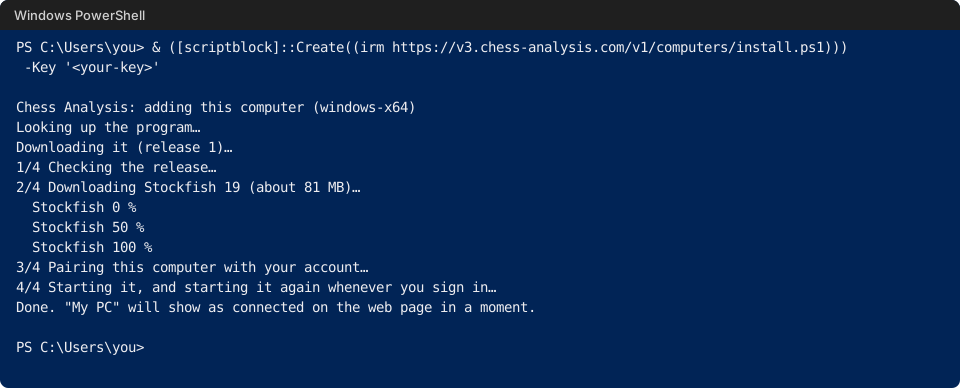
On the computer you want to add, open Terminal (macOS, Linux) or PowerShell (Windows), paste the command and press Enter. It downloads a small program and the Stockfish chess engine, and sets them up to start when you sign in to the computer.
Open PowerShell from the Start menu, paste the command from the page and press Enter. You do not need to run it as an administrator.
$ curl -fsSL https://v3.chess-analysis.com/v1/computers/install.sh | sh -s -- <your-key>
Chess Analysis: adding this computer (macos-arm64)
Looking up the program…
Downloading it (release 1)…
1/4 Checking the release…
2/4 Downloading Stockfish 19 (about 82 MB)…
  Stockfish 0 %
  Stockfish 50 %
  Stockfish 100 %
3/4 Pairing this computer with your account…
4/4 Starting it, and starting it again whenever you sign in…
Done. "MacBook Pro" will show as connected on the web page in a moment.
$
3.Wait for “connected”
You do not have to do anything. The page notices the computer by itself and says it is connected. From then on your analyses and reviews run on it.
The page switches to “connected” without a refresh. 4.Choose how much it uses
Half of the processor, all but one core (the default) or all of it. Your computer sleeps as usual unless you turn on “Keep awake while plugged in”. “Remove” takes everything off the computer again.
Power and sleep are one click each; “Remove” uninstalls.
Questions
What does the command install?
One small program and the official Stockfish engine, in a folder of its own (on a Mac, Application Support/ChessAnalysis). It starts when you sign in to the computer and nothing else. It does not touch your files.
Is it safe?
The program only connects out to Chess Analysis and calculates your own positions; nothing opens a port on your computer. It updates itself, and every update is signed with a key that is not on our servers, so a stolen server could not send your computer a fake one. The engine is downloaded from Stockfish's official releases and checked against a checksum.
Will it slow my computer down?
It works only while one of your own analyses or reviews is running, and by default leaves one core free. You can choose half the processor instead. Your computer goes to sleep as usual unless you ask it to stay awake while plugged in.
Do other people use my computer's power?
No. It calculates only for you, and what it finds is not shared with anyone else.
How do I remove it?
Press “Remove” next to the computer on the Devices page. The program, the engine and the start at sign-in are deleted from that computer, the next time it is on if it is off now. You can also run the removal command from the install page.
Do I need an account?
Yes. The command is made for your account, works once and is valid for 15 minutes.
Ready when you are
Sign in with Google. No card needed.